
How to Ace Interviews and Meetings with AI Assistance
How AI meeting assistants can provide real time help during meetings, interviews and screen shares, with a look at how OTO AI works.
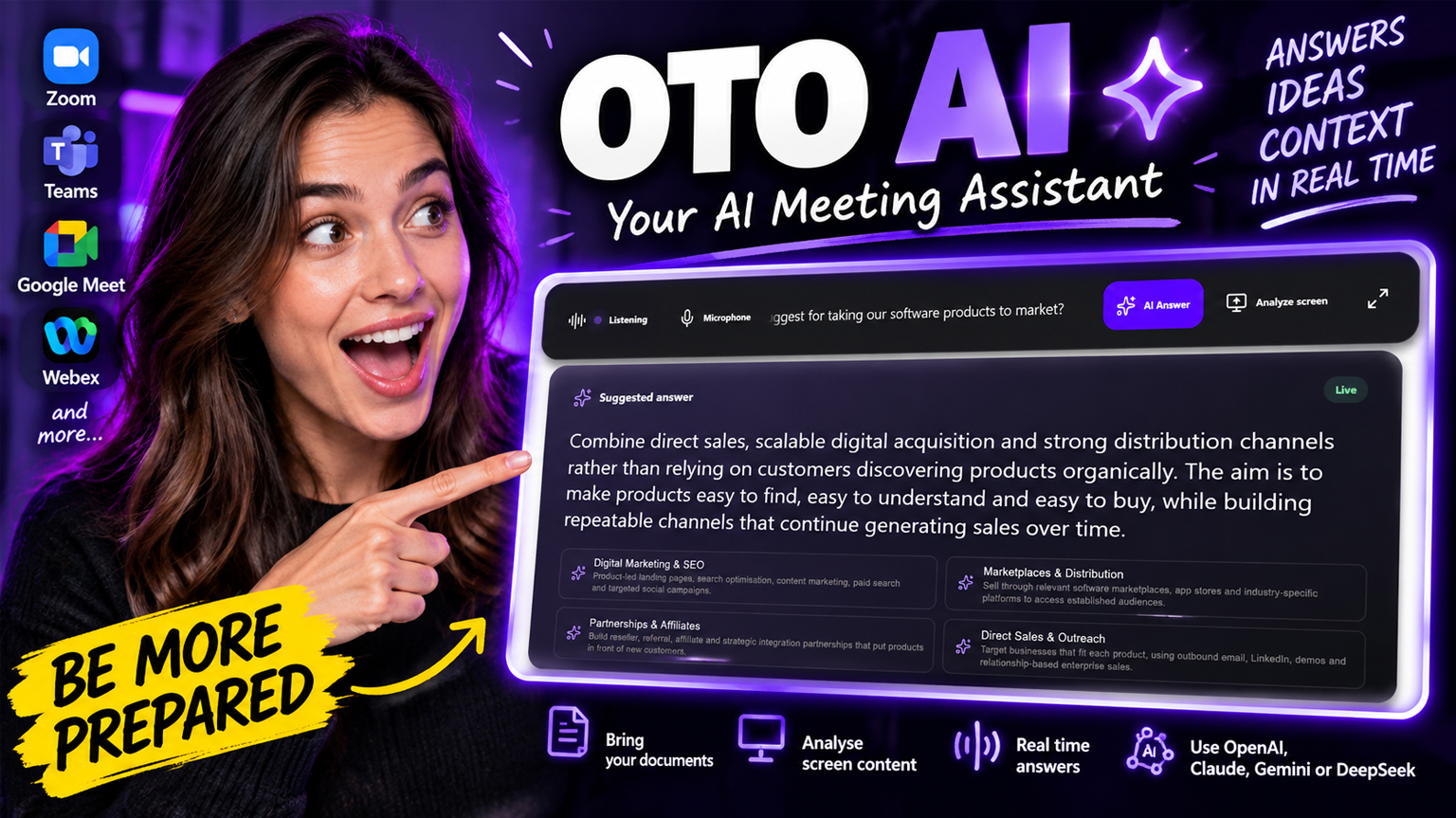
AI has become remarkably good at answering questions, explaining complex topics and helping people think through problems. But during a live meeting or interview, opening a chatbot, copying a question, explaining the context and waiting for an answer is rarely practical.
An AI meeting assistant solves a different problem. Instead of requiring you to leave the conversation and interact with AI separately, it can listen to the meeting as it happens and provide useful information when you need it.
OTO AI is a desktop AI meeting assistant designed for exactly this purpose. It listens to live conversations, detects questions and generates real time answers and context using an AI provider of your choice.
It can be used as an AI interview assistant, meeting assistant, research companion or general purpose AI copilot across Google Meet, Microsoft Teams, Zoom, Webex and other popular meeting platforms.
What is an AI meeting assistant?
An AI meeting assistant is software that uses artificial intelligence to help you during live conversations.
Traditional meeting assistants tend to concentrate on recording meetings, producing transcripts and generating summaries after the meeting has finished. OTO AI takes a different approach. It is designed to be useful while the conversation is actually happening.
OTO listens to the meeting audio, identifies questions and sends the relevant information to your selected AI model. The response appears inside OTO so you can quickly see an answer, explanation, relevant facts or key points without leaving your meeting. This makes it useful in situations where understanding, recalling information and responding in real time matters.
How OTO AI works
Using OTO is straightforward. Install OTO AI on your Windows PC or Mac, connect an AI provider using your own API key and choose the model you want to use. OTO currently supports AI models from OpenAI, Anthropic Claude, Google Gemini and DeepSeek, so you are not locked into a single AI ecosystem.
Once a meeting begins, OTO can listen to both the conversation and your microphone. When a question is detected, OTO generates an answer using the active AI model. OTO can also work with documents and background context you provide before the conversation. TXT, Markdown, DOCX and PDF files can be added as supporting material, allowing the AI to respond using information relevant to your meeting rather than relying only on what has just been said.
When the conversation moves beyond speech, OTO can use compatible multimodal AI models to analyse your screen. This is useful when someone shares a chart, presentation, document, application, code or other visual information and asks a question about it.
The result is an AI assistant that can work alongside the conversation, the information you bring into it and, when needed, what is happening on your screen.
Using OTO as an AI interview assistant
One of the most useful applications for OTO is as an AI interview assistant.
Interviews often involve questions where you understand the subject but need a few seconds to organise your thoughts or recall a specific fact, project or example. OTO can listen to the interview, recognise a question and provide relevant information or a structured response that you can use as a prompt for your own answer.
You can also prepare context before the interview. Information about the role, company, subject area, your own experience or other relevant material can be made available to the AI beforehand. This means an AI interview assistant can work with more than the words being spoken. It can draw on information relevant to the conversation as it develops.
“I should have said that.”
Most of us have had the same experience after a meeting or interview. You leave the call, think about a question someone asked and suddenly the answer you should have given becomes obvious.
“I should have said that.”
For most, it happens often enough and its always a hot talking point amongst colleagues from all walks of life. That got us wondering whether AI could solve the problem. At Sanity OS we spend a lot of my time moving between technical discussions, client calls, product decisions and conversations where the right answer often depends on something someone from the team read, built or discussed weeks earlier.
The problem was rarely that nobody knew the answer, it was being able to recall the right information at exactly the right moment.
AI seemed like an obvious solution, but using a normal chatbot during a conversation is surprisingly awkward. Someone asks a question, you switch windows, type enough context for the AI to understand what is happening, wait for an answer and then try to get back into the conversation... By then, the moment has usually passed.
We wanted something quieter, our clients did too. An AI meeting assistant that could listen alongside us, understand what was being discussed and help when needed without constantly switching windows or turning every conversation into a recording that had to be reviewed afterwards.
We tried existing solutions, but they often felt disproportionately expensive for what was actually needed. Some also lacked surprisingly basic things we all cared about, such as adjustable text sizes, technical context, control over which AI model was used and the ability to distinguish useful questions from ordinary conversational cues.
So we built OTO AI.
Bringing documents and context into the conversation
One of the biggest limitations of using a general AI chatbot during a meeting is context.
The AI might understand the subject being discussed, but it doesn't necessarily know about the project you've been working on for six months, the document someone sent last week or the technical decisions behind a product. OTO allows relevant documents and background information to be provided before the conversation begins.
This gives the AI additional context when answering questions during meetings, interviews and technical discussions. Instead of repeatedly explaining the background to a chatbot, the information can already be there when it is needed.
For an AI meeting assistant, that can be the difference between receiving a generic answer and receiving one that is actually relevant to the conversation.
An AI meeting and interview assistant without monthly fees
OTO AI is a one time purchase, not another monthly AI subscription.
Connect your own OpenAI, Claude, Gemini or DeepSeek API key and pay the AI provider directly for the usage you consume. Depending on the model and usage, a small amount of API credit can cover multiple meetings and interviews.
The model is simple: buy OTO once and own it for life.
For anyone looking for an AI meeting assistant without a subscription or an AI interview assistant without monthly fees, this avoids adding another recurring software cost while still providing access to leading AI models.
AI assistance when the conversation is happening
Meeting transcripts and summaries are useful, but sometimes the most valuable moment for AI assistance is before the meeting has ended. A question is asked. A document is discussed. Someone shares a screen. You know you've encountered the information before, but you can't quite recall it quickly enough.
That is the problem OTO AI is designed around.
Not replacing the person having the conversation, but giving them faster access to information, context and AI assistance at the moment it is actually useful.
And hopefully, fewer meetings that end with:
“I should have said that.”